


CodeSmith 使用 XMLProperty
在前面 CodeSmith 使用教程(6): 基本语法-声明和使用属性介绍了 CodeSmith 中使用属性的基本方法,模板中的属性是通过 Property 指令来定义。
CodeSmith 也支持使用 XML 文档来定义属性,可以把一些配置属性定义到 XML 文件中,定义 XML 的属性是使用 XmlProperty 来定义:
<%@ XmlProperty Name="PurchaseOrder"
   Schema="PO.xsd"
   Optional="False"
   Category="Data"
   Description="Purchase Order to generate packing list for." %>
XmlProperty 指令可以有多个参数,除 Name 为必须的外,其它的参考都是可选的。
属性参数的介绍:
- Name:模版使用的参数的名称,必须为有效的模板语言名称,比如使用 C#,Name 必须为有效的 C#变量名。但提供 XML 的 Schema 文件时,这个变量的类型为一个 XmlDocument 实例。
- Schema:XML 属性对应的 Schema 文件名,可以用来校验存放 XML 属性的 XML 文件是否有效,如果提供了 Schema 文件,CodeSmith 在代码模板中支持 IntelliSense。
在前面 CodeSmith 使用教程(6): 基本语法-声明和使用属性介绍了 CodeSmith 中使用属性的基本方法,模板中的属性是通过 Property 指令来定义。
CodeSmith 也支持使用 XML 文档来定义属性,可以把一些配置属性定义到 XML 文件中,定义 XML 的属性是使用 XmlProperty 来定义:
<%@ XmlProperty Name="PurchaseOrder"
   Schema="PO.xsd"
   Optional="False"
   Category="Data"
   Description="Purchase Order to generate packing list for." %>
XmlProperty 指令可以有多个参数,除 Name 为必须的外,其它的参考都是可选的。
属性参数的介绍:
- Name:模版使用的参数的名称,必须为有效的模板语言名称,比如使用 C#,Name 必须为有效的 C#变量名。但提供 XML 的 Schema 文件时,这个变量的类型为一个 XmlDocument 实例。
- Schema:XML 属性对应的 Schema 文件名,可以用来校验存放 XML 属性的 XML 文件是否有效,如果提供了 Schema 文件,CodeSmith 在代码模板中支持 IntelliSense。
- Default:设置默认值。
- Category:用来说明这个属性在 CodeSmith Explorer 的属性面板中显示成什么类型,例如下拉选择、直接输入等。
- Description:在属性面板中对于这个属性的描述。
- Optional:设置这个属性是否是必须的,设置为 True 表明这个参数值可有可无,设置为 False 则这个参数必须有值。
- OnChanged 为属性发生变化时定义事件处理代码。
- RootElement: 指定 XML 根元素的相对路径。
本例使用 CodeSmith 自带的一个例子,使用 PurchaseOrder.xsd ,XML 的定义如下:
<?xml version="1.0" encoding="utf-8"?>
<xs:schema targetNamespace="http://www.codesmithtools.com/purchaseorder"
elementFormDefault="qualified"
xmlns="http://www.codesmithtools.com/purchaseorder"
xmlns:xs="http://www.w3.org/2001/XMLSchema">
  <xs:element name="PurchaseOrder">
    <xs:complexType>
      <xs:sequence>
        <xs:element name="OrderDate" type="xs:string" minOccurs="1" maxOccurs="1" />
        <xs:element name="SubTotal" type="xs:string" minOccurs="1" maxOccurs="1" />
        <xs:element name="ShipCost" type="xs:string" minOccurs="0" maxOccurs="1" />
        <xs:element name="TotalCost" type="xs:string" minOccurs="1" maxOccurs="1" />
        <xs:element name="ShipTo" minOccurs="0" maxOccurs="1">
          <xs:complexType>
            <xs:sequence>
              <xs:element name="Line1" type="xs:string" minOccurs="0" maxOccurs="1" />
              <xs:element name="City" type="xs:string" minOccurs="0" maxOccurs="1" />
              <xs:element name="State" type="xs:string" minOccurs="0" maxOccurs="1" />
              <xs:element name="Zip" type="xs:string" minOccurs="0" maxOccurs="1" />
            </xs:sequence>
            <xs:attribute name="Name" type="xs:string" />
          </xs:complexType>
        </xs:element>
        <xs:element name="Items" minOccurs="0" maxOccurs="1">
          <xs:complexType>
            <xs:sequence>
              <xs:element name="OrderedItem" minOccurs="0" maxOccurs="unbounded">
                <xs:complexType>
                  <xs:sequence>
                    <xs:element name="ItemName" type="xs:string" minOccurs="1" maxOccurs="1" />
                    <xs:element name="Description" type="xs:string" minOccurs="0" maxOccurs="1" />
                    <xs:element name="UnitPrice" type="xs:string" minOccurs="1" maxOccurs="1" />
                    <xs:element name="Quantity" type="xs:string" minOccurs="1" maxOccurs="1" />
                    <xs:element name="LineTotal" type="xs:string" minOccurs="1" maxOccurs="1" />
                  </xs:sequence>
                </xs:complexType>
              </xs:element>
            </xs:sequence>
          </xs:complexType>
        </xs:element>
      </xs:sequence>
    </xs:complexType>
  </xs:element>
</xs:schema>
与这个 XML Schema 配合使用的用来存放 XML 属性的 XML 文件为 SamplePurchaseOrder.xml ,其定义如下:
<?xml version="1.0"?>
<PurchaseOrder xmlns="http://www.codesmithtools.com/purchaseorder">
  <ShipTo Name="Eric J. Smith">
    <Line1>123 Test Dr.</Line1>
    <City>Dallas</City>
    <State>TX</State>
    <Zip>75075</Zip>
  </ShipTo>
  <OrderDate>05-01-2003</OrderDate>
  <Items>
    <OrderedItem>
      <ItemName>Item #1</ItemName>
      <Description>Item #1 Description</Description>
      <UnitPrice>5.45</UnitPrice>
      <Quantity>3</Quantity>
      <LineTotal>16.35</LineTotal>
    </OrderedItem>
    <OrderedItem>
      <ItemName>Item #2</ItemName>
      <Description>Item #2 Description</Description>
      <UnitPrice>12.75</UnitPrice>
      <Quantity>8</Quantity>
      <LineTotal>102.00</LineTotal>
    </OrderedItem>
  </Items>
  <SubTotal>45.23</SubTotal>
  <ShipCost>5.23</ShipCost>
  <TotalCost>50.46</TotalCost>
</PurchaseOrder>
定义一个简单的模板,把 SamplePurchaseOrder.xml 中的内容重新输出,可以在代码模板中定义一个XMLProperty ,其 Schema 指定为 PurchaseOrder.xsd
<%--
This template demonstates using the XmlProperty directive
--%>
<%@ CodeTemplate Language="C#" TargetLanguage="Text"
  Description="Demonstrates using the Xml serializer." %>
<%@ XmlProperty
   Name="MyPurchaseOrder"
   Schema="PurchaseOrder.xsd"
   Default="SamplePurchaseOrder.xml" %>
This file generated by CodeSmith on <%= DateTime.Now.ToLongDateString() %>

PurchaseOrder:
    Address:
        Name: <%= MyPurchaseOrder.ShipTo.Name %>
        Line1: <%= MyPurchaseOrder.ShipTo.Line1 %>
        City: <%= MyPurchaseOrder.ShipTo.City %>
        State: <%= MyPurchaseOrder.ShipTo.State %>
        Zip: <%= MyPurchaseOrder.ShipTo.Zip %>
    OrderDate: <%= MyPurchaseOrder.OrderDate %>
    Items:
        <% for (int i = 0; i < MyPurchaseOrder.Items.Count; i++) { %>
        <%= i %>:
            ItemName: <%= MyPurchaseOrder.Items[i].ItemName %>
            Description: <%= MyPurchaseOrder.Items[i].Description %>
            UnitPrice: <%= MyPurchaseOrder.Items[i].UnitPrice %>
            Quantity: <%= MyPurchaseOrder.Items[i].Quantity %>
            LineTotal: <%= MyPurchaseOrder.Items[i].LineTotal %>
        <% } %>
    SubTotal: <%= MyPurchaseOrder.SubTotal %>
    ShipCost: <%= MyPurchaseOrder.ShipCost %>
    TotalCost: <%= MyPurchaseOrder.TotalCost %>
模板中定义的 XML 属性名为 MyPurchaseOrder 对应的 Schema 为 PurchaseOrder.xsd ,因此在代码模板可以通过 MyPurchaseOrder.ShipTo.Name 的格式来直接引用 XML Schema 中定义的元素,CoddSmith 也支持 IntelliSense。
运行该模板,首先需要为 MyPurchaseOrder 选择合适的 XML 文件:
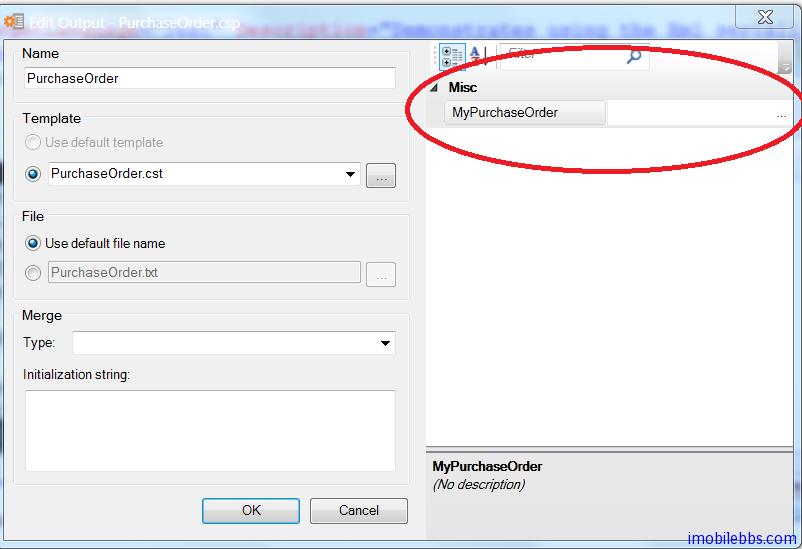
如果选择的文件不符合指定的 XML Schema,CodeSmith 不允许选择该文件,本例使用预先定义的SamplePurchaseOrder.xml ,生成的文件如下:
This file generated by CodeSmith on Saturday, 12 January 2013

PurchaseOrder:
    Address:
        Name: Eric J. Smith
        Line1: 123 Test Dr.
        City: Dallas
        State: TX
        Zip: 75075
    OrderDate: 05-01-2003
    Items:
        0:
            ItemName: Item #1
            Description: Item #1 Description
            UnitPrice: 5.45
            Quantity: 3
            LineTotal: 16.35
        1:
            ItemName: Item #2
            Description: Item #2 Description
            UnitPrice: 12.75
            Quantity: 8
            LineTotal: 102.00
    SubTotal: 45.23
    ShipCost: 5.23
    TotalCost: 50.46